Features
A private video vault for iPhone
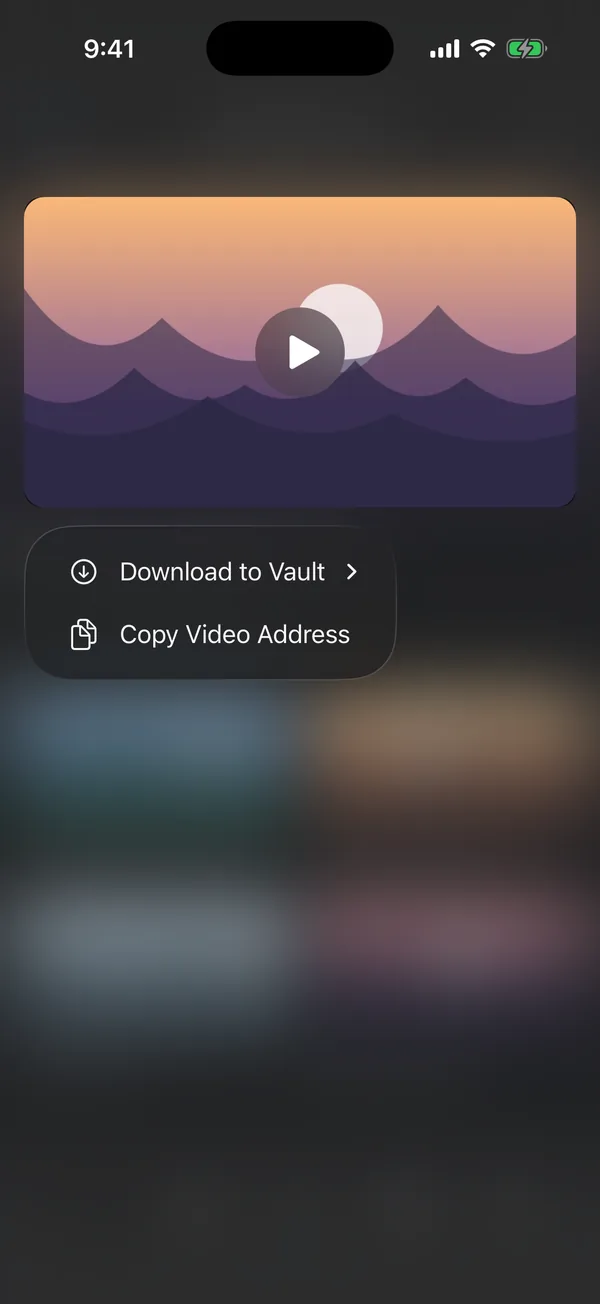
Blank saves videos and photos from websites straight into an encrypted vault inside the app. Nothing you save appears in Photos, Recently Deleted, iCloud Photos, or the Files app, and the vault opens only with Blank's own passcode.
Download Blank freeSave a video in two taps
- Open the page with the video in Blank.
- Touch and hold the video, then tap Download to Vault. Pick a folder, or make a new one.
The download keeps going while you browse, switch tabs, or close the tab. A bar above the toolbar shows its progress, and you can cancel it there.
When a video plays full screen, Blank shows a Download to Vault button above the player. You can also paste a link: in the vault, tap + and choose Download from Link. Blank takes a direct file, a stream link, or the address of a page, and saves the page's main video.
What Blank can save
- Video files, and the streams most sites use to play video (HLS), including streams with separate audio.
- Photos, PDFs, and other files a site offers.
Blank does not download from streaming services such as YouTube, Netflix, or Spotify, whose terms do not allow it, or from copy-protected and live video.
Where your videos go
Blank encrypts every file on your iPhone before it writes it, with a key kept in the iPhone's Keychain. The vault lives in Blank's own storage, which is left out of iCloud and device backups. Files never reach Photos or Files, so they never show up in Recently Deleted, in Memories, or on another device signed in to your Apple Account.
Watch them inside Blank
The vault opens each folder as a full-screen feed. Swipe up for the next video. Videos loop, a tap pauses, and holding plays at 2× speed. Photos zoom. Blank plays each video from the encrypted file and never writes a decrypted copy.
Move the videos you already have
In the vault, tap + and import from Photos. Blank offers to delete the originals after the import. iOS keeps deleted items in Recently Deleted for 30 days, so empty that album too. The guide How to keep saved videos out of Photos shows each step.
Keep the vault off your phone with Blank+
A vault that holds many gigabytes shows up as a large app in iPhone Storage. Cloud Vault keeps up to 100 GB of your vault in the cloud, and the phone keeps only small previews. Each video is encrypted on your iPhone before it uploads, so we cannot open it, and it streams back when you play it.
Blank+ also adds an encrypted backup, locked with 12 recovery words only you have. Blank+ costs $7.99 a month or $69.99 a year, and the yearly plan starts with a 7-day free trial.
Questions
Do videos saved in Blank show up in Photos?
No. They go only to Blank's vault. They never appear in Photos, Recently Deleted, iCloud Photos, or the Files app.
Is the vault free?
Yes. The vault and video downloads are free, with no size limit on your iPhone. Blank+ adds the 100 GB Cloud Vault and an encrypted backup.
What happens to my vault if I delete Blank?
Deleting Blank deletes the vault from your iPhone. With Blank+ backup on, you can restore it on any iPhone with your 12 recovery words.